
M
917



Normally, when we work with Numbers, we use primitive data types such as byte, int, long, double, etc.[h=2]Example:[/thanks]
int i = 5000;float gpa = 13.65;byte mask = 0xaf;However, in development, we come across situations where we need to use objects instead of primitive data types. In-order to achieve this Java provides wrapper classes for each primitive data type.All the wrapper classes (Integer, Long, Byte, Double, Float, Short) are subclasses of the abstract class Number.
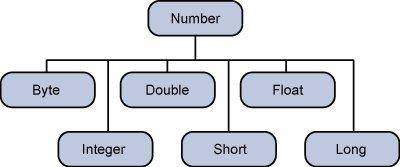 This wrapping is taken care of by the compiler, the process is called boxing. So when a primitive is used when an object is required, the compiler boxes the primitive type in its wrapper class. Similarly, the compiler unboxes the object to a primitive as well. The Number is part of the java.lang package.Here is an example of boxing and unboxing:
public class Test{ public static void main(String args[]){ Integer x = 5; // boxes int to an Integer object x = x + 10; // unboxes the Integer to a int System.out.println(x); }}This would produce the following result:
15When x is assigned integer values, the compiler boxes the integer because x is integer objects. Later, x is unboxed so that they can be added as integers.[h=2]Number Methods:[/thanks]Here is the list of the instance methods that all the subclasses of the Number class implement:
[h=2]What is Next?[/thanks]In the next section, we will be going through the Character class in Java. You will be learning how to use object Characters and primitive data type char in Java.
int i = 5000;float gpa = 13.65;byte mask = 0xaf;However, in development, we come across situations where we need to use objects instead of primitive data types. In-order to achieve this Java provides wrapper classes for each primitive data type.All the wrapper classes (Integer, Long, Byte, Double, Float, Short) are subclasses of the abstract class Number.
public class Test{ public static void main(String args[]){ Integer x = 5; // boxes int to an Integer object x = x + 10; // unboxes the Integer to a int System.out.println(x); }}This would produce the following result:
15When x is assigned integer values, the compiler boxes the integer because x is integer objects. Later, x is unboxed so that they can be added as integers.[h=2]Number Methods:[/thanks]Here is the list of the instance methods that all the subclasses of the Number class implement:
| SN | Methods with Description |
|---|---|
| 1 | Log in or register to view links Converts the value of this Number object to the xxx data type and returned it. |
| 2 | Log in or register to view links Compares this Number object to the argument. |
| 3 | Log in or register to view links Determines whether this number object is equal to the argument. |
| 4 | Log in or register to view links Returns an Integer object holding the value of the specified primitive. |
| 5 | Log in or register to view links Returns a String object representing the value of specified int or Integer. |
| 6 | Log in or register to view links This method is used to get the primitive data type of a certain String. |
| 7 | Log in or register to view links Returns the absolute value of the argument. |
| 8 | Log in or register to view links Returns the smallest integer that is greater than or equal to the argument. Returned as a double. |
| 9 | Log in or register to view links Returns the largest integer that is less than or equal to the argument. Returned as a double. |
| 10 | Log in or register to view links Returns the integer that is closest in value to the argument. Returned as a double. |
| 11 | Log in or register to view links Returns the closest long or int, as indicated by the method's return type, to the argument. |
| 12 | Log in or register to view links Returns the smaller of the two arguments. |
| 13 | Log in or register to view links Returns the larger of the two arguments. |
| 14 | Log in or register to view links Returns the base of the natural logarithms, e, to the power of the argument. |
| 15 | Log in or register to view links Returns the natural logarithm of the argument. |
| 16 | Log in or register to view links Returns the value of the first argument raised to the power of the second argument. |
| 17 | Log in or register to view links Returns the square root of the argument. |
| 18 | Log in or register to view links Returns the sine of the specified double value. |
| 19 | Log in or register to view links Returns the cosine of the specified double value. |
| 20 | Log in or register to view links Returns the tangent of the specified double value. |
| 21 | Log in or register to view links Returns the arcsine of the specified double value. |
| 22 | Log in or register to view links Returns the arccosine of the specified double value. |
| 23 | Log in or register to view links Returns the arctangent of the specified double value. |
| 24 | Log in or register to view links Converts rectangular coordinates (x, y) to polar coordinate (r, theta) and returns theta. |
| 25 | Log in or register to view links Converts the argument to degrees |
| 26 | Log in or register to view links Converts the argument to radians. |
| 27 | Log in or register to view links Returns a random number. |

